

CodeForge AICodeForge AI
ProblemsForumPricingDocsBlog
Sign inGet started

Getting Started

  • What is CodeForge AI?
  • Create your account
  • Solve your first problem
  • Using the online compiler

Platform Features

  • Problems, tracks & roadmaps
  • Smart Revision (spaced repetition)
  • Skill analytics & weakness detection
  • Contests & leaderboards
  • Mock interview simulator
  • Community & discussions

AI Tools

  • AI Mentor
  • AI Tools suite
  • AI credits & monthly limits

API & SDKs

  • API overview & authentication
  • Endpoints & examples
  • Rate limits
  • Razorpay webhooks

Guides & Tutorials

  • Tutorial: solve a DSA problem end-to-end
  • Guide: build a study plan
  • Guide: prepare for a company interview

Plans & Billing

  • Plans & pricing
  • Subscriptions & auto-pay
  • Coupon codes
  • Downloading invoices
  • Cancel or delete your account

FAQ

  • Frequently asked questions
DocsPlans & BillingDownloading invoices

Downloading invoices
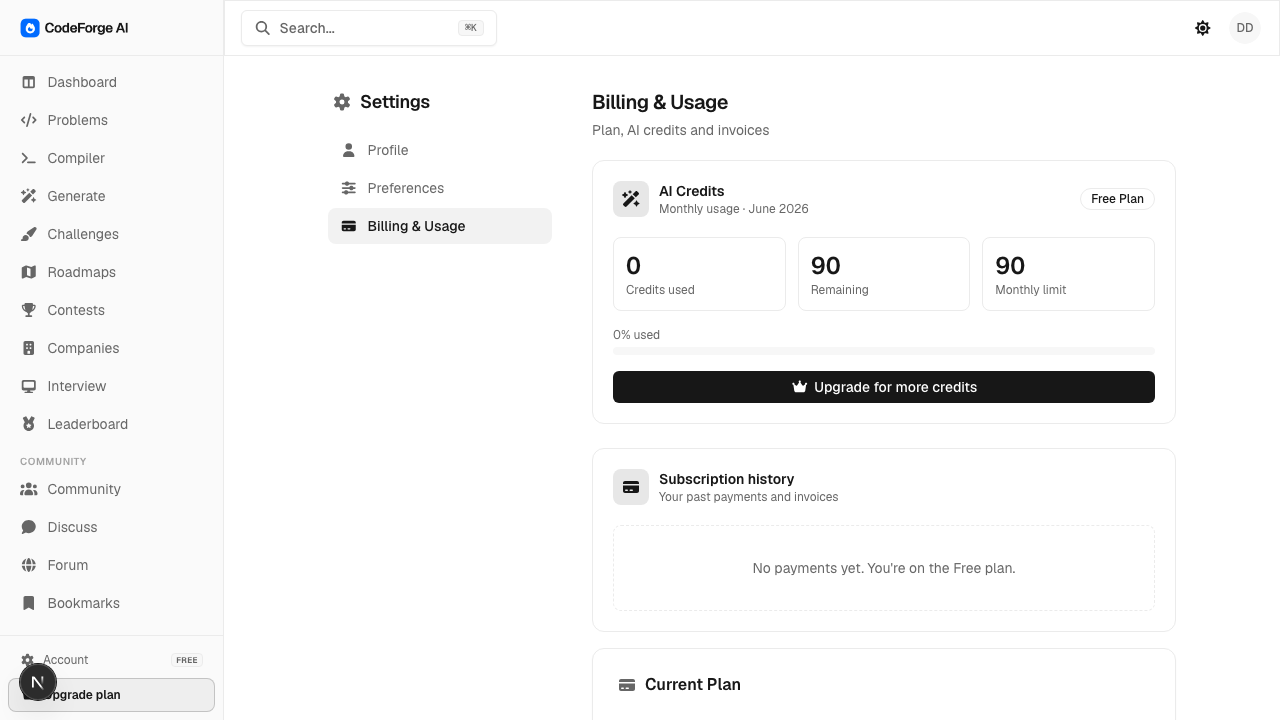
Billing & Usage with subscription history

Every successful payment (including each auto-renewal) creates an invoice.

  1. Open Settings → Billing & Usage.
  2. Find the payment in Subscription history.
  3. Click Invoice to open a printable, branded invoice (use your browser's Print → Save as PDF). It includes your billing address and our contact, info@codeforgeai.io.
PreviousCoupon codesNextCancel or delete your account
← All documentation

Still stuck? Contact support