

CodeForge AICodeForge AI
ProblemsForumPricingDocsBlog
Sign inGet started

Getting Started

  • What is CodeForge AI?
  • Create your account
  • Solve your first problem
  • Using the online compiler

Platform Features

  • Problems, tracks & roadmaps
  • Smart Revision (spaced repetition)
  • Skill analytics & weakness detection
  • Contests & leaderboards
  • Mock interview simulator
  • Community & discussions

AI Tools

  • AI Mentor
  • AI Tools suite
  • AI credits & monthly limits

API & SDKs

  • API overview & authentication
  • Endpoints & examples
  • Rate limits
  • Razorpay webhooks

Guides & Tutorials

  • Tutorial: solve a DSA problem end-to-end
  • Guide: build a study plan
  • Guide: prepare for a company interview

Plans & Billing

  • Plans & pricing
  • Subscriptions & auto-pay
  • Coupon codes
  • Downloading invoices
  • Cancel or delete your account

FAQ

  • Frequently asked questions
DocsGetting StartedSolve your first problem

Solve your first problem
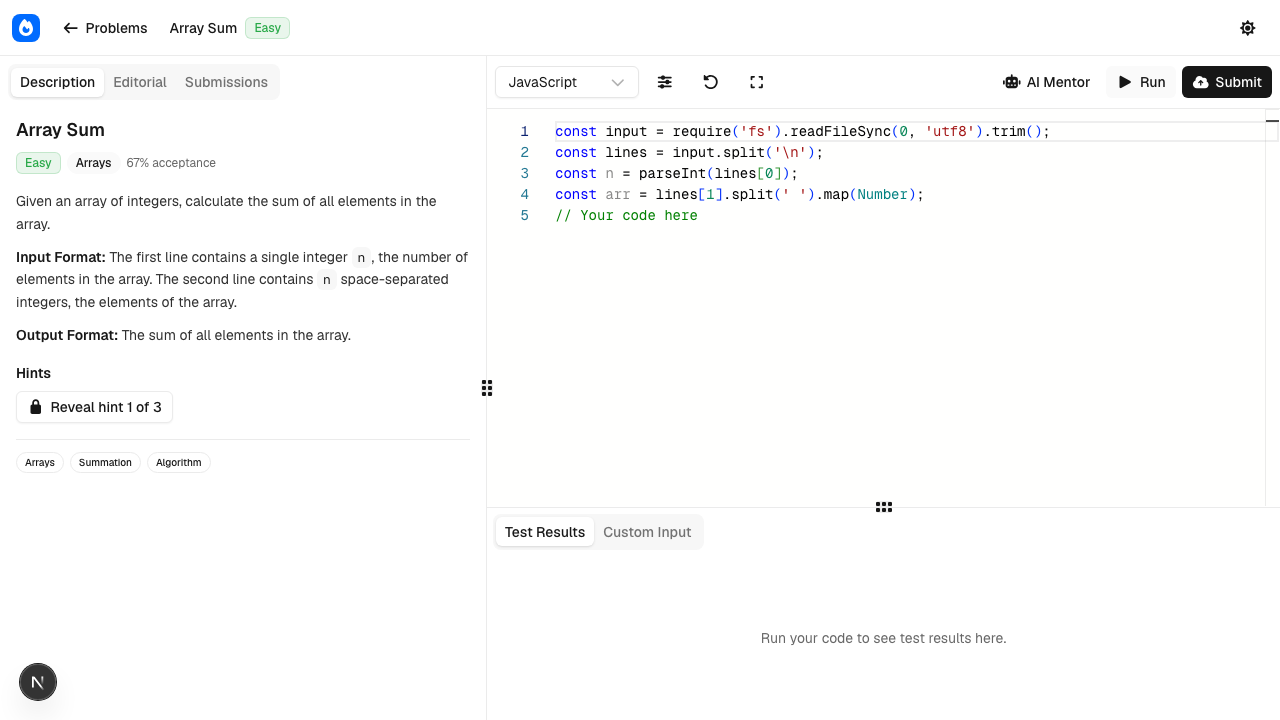
Solving a problem in the editor

  1. Open Problems and pick an Easy one to start.
  2. Choose your language in the editor (12 are supported).
  3. Write your solution. Press Run to test against the sample cases — you'll see pass/fail per case plus runtime.
  4. Press Submit to judge against the full hidden test suite. A passing submission awards XP and may unlock badges.

Stuck? Open the AI Mentor panel for a progressive hint that nudges you toward the idea without spoiling the solution. See AI Mentor.

PreviousCreate your accountNextUsing the online compiler
← All documentation

Still stuck? Contact support